Blog · Growth · 4-min read
Leveraging OpenAI's API: A Guide for Startups
Learn how startups can leverage OpenAI’s API to automate tasks, boost productivity, and build smarter apps without breaking the bank.
Let's cut to the chase: OpenAI is not just for AI researchers, engineers, or enterprise giants.
Any startup, including those in the pre-seed stage, can harness the power of OpenAI to build faster, operate leaner, and create better products that customers will love.
You could be developing a productivity tool or building a customer support bot. With OpenAI's API (short for Application Programming Interface in dev speak), you can gain quick access to some of the world's cutting-edge language models, all just by using a few lines of code.
At Horizon Labs, we worked with over 60 startups that needed to integrate OpenAI's API into their stack. Whether you're in the idea stage or post-Series A, here is a practical guide on how you can do it yourself.
OpenAI is an AI research and development organization based in San Francisco, CA. For most non-technical founders, the first thing that comes to mind upon hearing OpenAI would be ChatGPT, a leading generative AI and Large Language Model (LLM).
An API, on the other hand, functions as an intermediary that forwards requests to backend systems and returns structured responses.
Think of an API as a waiter in a restaurant, forwarding orders from customers to the kitchen staff in the back. And when the food is ready, the waiter delivers the order back to the customer.
In a nutshell, OpenAI’s API gives you access to models or their features, like GPT-4, Codex, and DALL-E.
These models can process or "understand" human prompts to perform various tasks, including but not limited to:
With the OpenAI API, you can leverage some of the most advanced LLMs in the market to integrate automated features into workflows or your product itself, without building your own AI systems from scratch.
Before we unpack more of OpenAI, here's a quick rundown of the benefits of using its API:
Startups run on tight timelines and tighter budgets.
OpenAI's API is a huge game-changer for these companies. With light coding, any startup can integrate advanced AI features into their product, reducing engineering overhead, accelerating development, and speeding up their time to market.
With the OpenAI API, you don't need an expensive, homegrown AI model to implement automated features, like support chatbots and personalization.
GPT-4, for instance, can deliver human-like responses to any user, whereas Codex can recommend improvements in your code that increase performance. Not to mention that AI-assisted development through OpenAI is less prone to human error.
Sure, you shouldn't expect beautiful, elegant code if it's mostly done by AI. But at the very least, AI can lay the groundwork for supercharging product development.
You don’t need to build a full-on AI-powered product to benefit from the OpenAI API. Startups in various verticals can tap into the power of LLMs to speed up or improve features (aside from chatbots), such as:
In addition to the modular implementations of OpenAI listed above, here’s a breakdown of real-world examples we’ve built or seen:
In simple terms, an AI copilot is a tool that speeds up workflows in document management or creation features, be it for emails, legal contracts, resumes, website articles, and so on.
For example, Microsoft Copilot is an AI companion designed to work seamlessly with Microsoft 365 products.
Microsoft Copilot utilizes the Azure OpenAI service to handle user prompts and pull in responses. You can use it to create images, foolproof strategies, generate ideas, write drafts, and more.
Quality data management sharpens decision-making and turns any outcome into a growth opportunity.
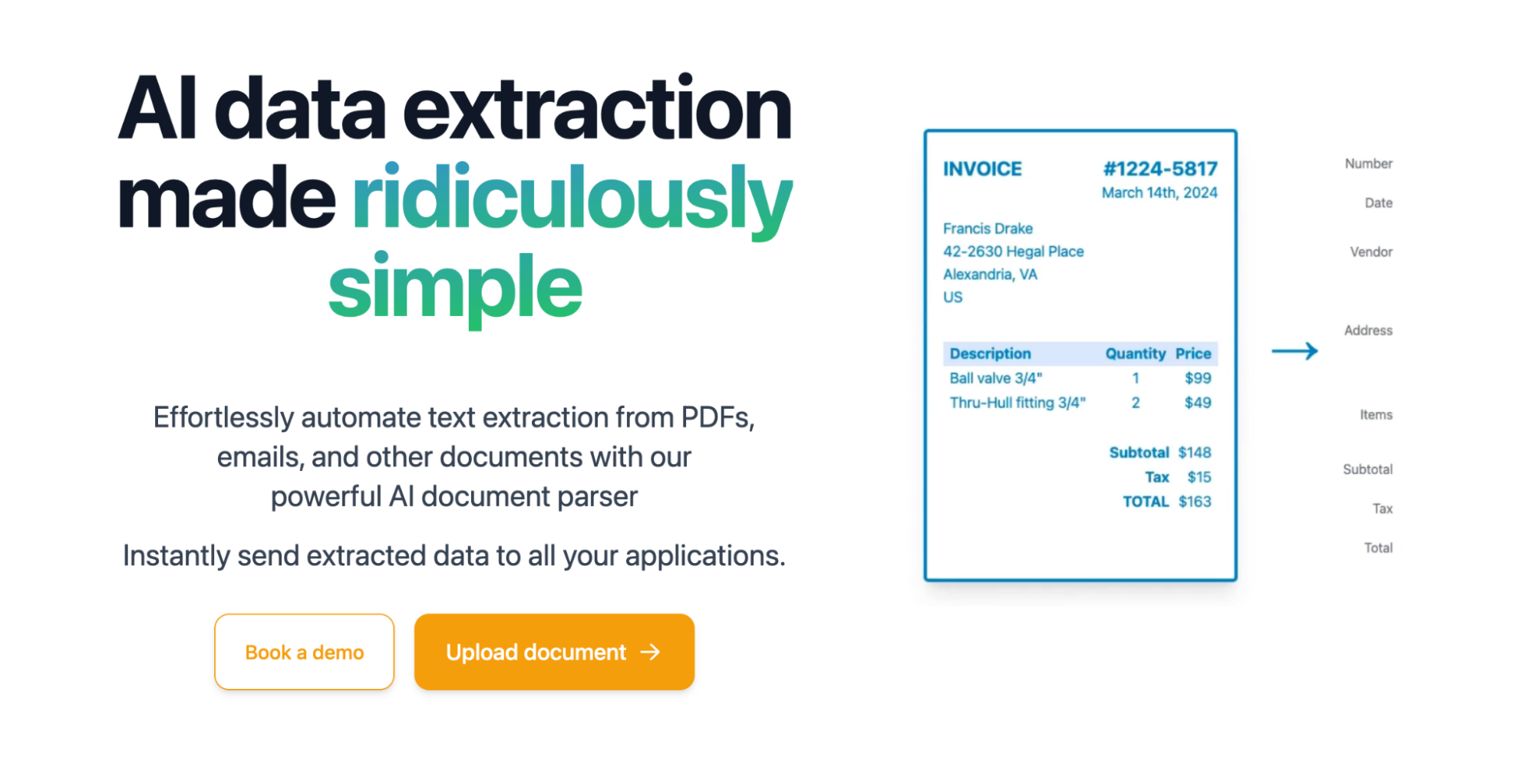
With OpenAI, companies can incorporate data enrichment features into their product, from auto-tagging CRM entries to extracting structured information from PDF documents.
Parseur, for example, is an AI-powered data extraction software that uses OpenAI to obtain information even from unstructured media. Some examples are invoices, PDF documents, and receipts.
Any software solution that handles information can take advantage of AI knowledge assistants to supercharge productivity.
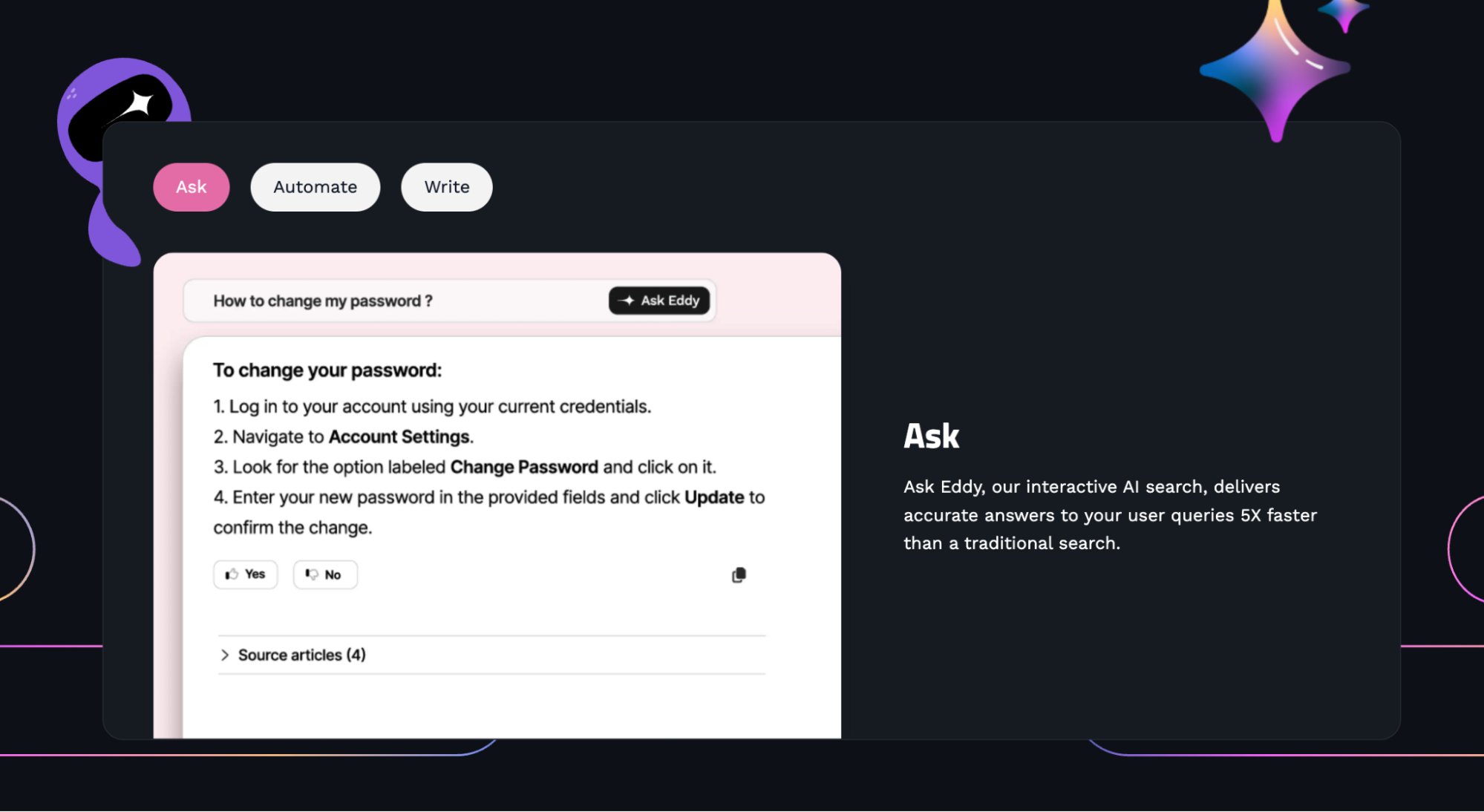
A common use case would be internal search tools for online wikis, software technical documentation, and so on.
Document360, for instance, is a knowledge management platform with an OpenAI-powered chatbot, AKA "Ask Eddy AI." This comes alongside other features like automatic summaries and text generation, which all use the OpenAI API.
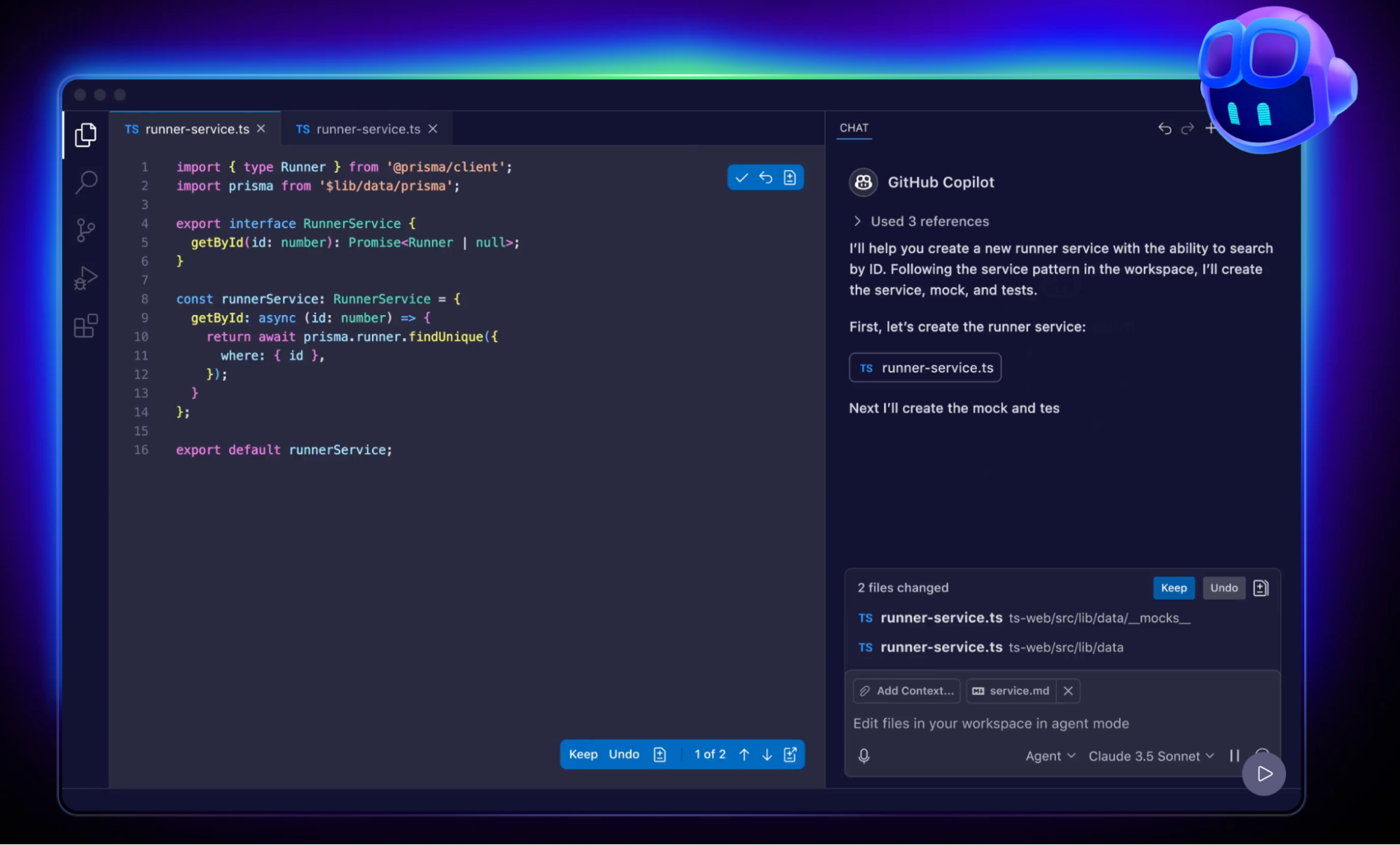
SaaS products for developers can also use OpenAI to enable time-saving features, including log explainers, code generators, and test case creators.
A popular example would be GitHub Copilot, which utilizes OpenAI models for a slew of programming tasks. You can instruct it to generate code, run tests, and iterate with just a few lines of text-based prompts.
To help your startup reap the full benefits of the OpenAI API, below are a few common mistakes you should avoid:
While AI solutions and LLMs can do a lot, that doesn't mean they excel at everything.
The best approach is to identify a singular, clear user pain point that can be addressed with AI. Rather than going full steam ahead on a "chatbot that does everything," focus on a narrow use case and wait for traction before more ambitious implementations.
Although OpenAI's API is designed to be cost-effective and affordable at low volumes, you can rack up a bill quite fast as you scale.
Fortunately, you can avoid this with tools like rate-limiting, caching, and truncation techniques. A specific tactic would be to embed frequent OpenAI requests into a vector database like Pinecone, which could lead to significant savings from API tokens.
Ultimately, OpenAI is a tool for optimizing UX, not a UX upgrade package in a box just waiting to be unpacked.
You still need refined coding, numerous tests, and continuous iteration to ensure quality outputs. Of course, AI features should also be fast and intuitive to serve their function as enhancements.
Ready to dip your toes into OpenAI's capabilities?
Below are additional tips to keep in mind:
Consider investing in these tools alongside OpenAI's API:
Remember: Don’t build a huge system upfront.
Use tools like Postman or Python notebooks to test prompts manually, and you’ll save time and headaches.
If you're in regulated markets like healthcare, finance, or education, complying with laws like the Health Insurance Portability and Accountability Act (HIPAA) is a must.
OpenAI provides zero data retention endpoints to help you with this. You just need to perform a few steps, like submitting a Business Associate Agreement (BAA) request to baa@openai.com.
Working on a solo project or lacking AI or infrastructure expertise?
Bringing in seasoned veterans can and will save you from painful mistakes, especially when integrating tech like OpenAI's API.
At Horizon Labs, we've encountered countless founders trying to duct-tape AI into their product while completely ignoring token costs, context management, UX, and prompt engineering. In fact, we're often called in after things break.
The truth is, refusing to bring in an expert until it's too late is one of the worst things you can do for your startup. Any amount you think you'll save is peanuts compared to the costs of fixing the mess after going in blind.
If you have any questions regarding the OpenAI API or anything related to product development, feel free to contact us here.
OpenAI’s API isn’t just cool tech. It’s a strategic weapon for lean startups trying to punch above their weight.
From automating the boring stuff to supercharging your product, it’s one of the fastest ways to deliver customer value without ballooning your engineering team.
However, just because you can use the OpenAI API doesn't mean you should.
Before you jump in, consider validating your OpenAI use case first before going in.
You can validate your idea using OpenAI’s Playground or tools like ChatGPT.
Here’s how:
Using your AI tool of choice, enter a mock prompt your product would send. Be as specific as possible and be sure to provide context to ensure the AI understands the assignment.
The next step is to test different input styles to evaluate accuracy and identify potential issues early on.
In some cases, you can upload files to see how OpenAI models process such inputs. You might be surprised at the data parsing capabilities of modern LLMs right out of the box.
Thoroughly inspect the entire response and evaluate whether the process would genuinely save time, reduce friction, and offer great value to users.
Now would also be a great time to test how the AI evaluates certain cases.
If you're seeing real value to be realized from your use case, plan how the feature translates as a visual experience.
For this, you can use an interface design tool like Figma to create a mockup. Or, use no-code tools like Webflow, Bubble, or Framer for an interactive prototype.
Remember, founders think that validation means building the code.
It doesn't.
You can still get valuable insights from fake buttons, simulations, and test user feedback. And the best news is, building the mock experience costs little to nothing.
Prompting is half art and half science.
It's also half of the process of leveraging LLMs for product development.
Here’s what we’ve learned:
Think of prompts like UX copy: they shape the user's experience more than you might think.
Founders often ask, “How do I price this GPT-powered tool?” Here are a few ways to think about it:
At Horizon Labs, we’ve helped startups in AI, marketplaces, SaaS, and healthtech leverage OpenAI’s API to drive real outcomes.
Whether you're building your first AI prototype or adding intelligent features to an existing app, our team knows how to get it done: fast, securely, and within budget.
Need help integrating OpenAI or unsure if it’s right for you?
Let’s chat. Email us at info@horizon-labs.co or book a free consult at https://www.horizon-labs.co/contact. If we’re not the right fit, we’ll gladly introduce you to trusted partners who’ve helped our portfolio founders succeed.
Q: Do I need a machine learning background to use OpenAI’s API?
A: Nope. One of the best things about OpenAI’s API is that it's designed for developers of all levels. If you can make an HTTP request, you can integrate it. That said, understanding the basics of prompt design and API structure will help you get better results.
Q: How much does it cost to use OpenAI’s API for my startup?
A: Pricing depends on the model you use (e.g., GPT-3.5 is cheaper than GPT-4) and the number of tokens processed per request. Many early-stage startups can operate comfortably within $20–$100/month during prototyping. Once you hit scale, smart caching and token management can help keep things affordable.
Q: Can I fine-tune the models on my own startup’s data?
A: Yes, OpenAI supports fine-tuning on certain models. But for most startups, prompt engineering and embeddings (for search or contextual memory) are sufficient and way cheaper. Fine-tuning makes sense only if you're solving a highly specific problem that generic models can’t handle well.
Q: What if OpenAI’s API is down or changes behavior?
A: That’s a valid concern. Build fallbacks into your app and keep a close eye on OpenAI’s changelog. Consider hybrid approaches, e.g., using open-source models locally for backup or latency-sensitive operations.
Q: Can I build a fully AI-powered product just using OpenAI’s API?
A: Technically, yes. But in practice, the best products combine AI with smart UX, domain logic, and human oversight. Don’t rely solely on OpenAI. Use it as a core enabler, not the entire brain of your app.
Q: How can I ensure the outputs from OpenAI are accurate and trustworthy?
A: Always include a human-in-the-loop for critical use cases, especially in healthcare, finance, or legal domains. You can also apply post-processing rules, validation layers, or confidence scoring to catch hallucinations or incomplete responses.
Q: What’s the difference between using OpenAI directly vs. a wrapper tool like Jasper or Copy.ai?
A: Tools like Jasper are great for marketing teams and fast prototyping, but they’re limited in customization. OpenAI’s API gives you full control over the prompts, outputs, and integration logic, ideal for startups building proprietary products.
Q: Are there any legal risks in using OpenAI’s API for commercial products?
A: Most use cases are fine, but read OpenAI’s terms of use. Don’t submit PII, copyrighted data, or use it for regulated decisions unless you’re on a compliant enterprise plan. Always review what’s stored and logged.
Q: How do I deal with context window limitations in GPT models?
A: If you’re working with long documents or conversations, chunk and compress inputs, use embedding-based retrieval with tools like LangChain, or leverage models with extended context like GPT-4-32k. Designing around this constraint is key for scaling.
Q: Is there a way to track and analyze how users interact with GPT features?
A: Absolutely. Log every prompt and response, then layer on tools like PostHog or Mixpanel to track engagement and drop-off. This helps you refine both UX and prompt logic over time, turning your GPT feature into a polished product.
At Horizon Labs, we’ve helped dozens of startups, across AI, SaaS, marketplaces, and healthtech, leverage OpenAI’s API to deliver smarter, faster, and leaner products.
Whether you’re validating a new AI feature or scaling a production-grade system, we’re the technical partner that founders trust when they can’t afford to get it wrong. We don’t just plug in APIs. We help you design experiences, optimize cost, and build infrastructure that scales.
Need help integrating OpenAI’s API the right way? Shoot us a message at info@horizon-labs.co or schedule a free strategy call at https://www.horizon-labs.co/contact. And if you’re looking for something outside our wheelhouse, we’ll happily connect you to vetted partners who’ve helped other founders we trust.

Explore the top 100 startup funds for every stage, pre-seed, seed, and growth. Find the right investors and accelerators to help your business thrive.

Ready to launch your SaaS startup? Follow our 31-point pre-launch checklist for a smooth, successful debut. Get insights on branding, pricing, and marketing.

Learn what 500 Startups (now 500 Global) is, how its accelerator and seed fund work, and when founders should consider it. Plus tips for early-stage startups.
Tell us what you're building. After an intro call with our founders, you'll hear back within 72 business hours: a written scope with an hour range and a hard ceiling, or the questions we need answered first.